Seating & catering
Final Seating Handoff for Venues & Caterers
Learn which floor-plan PDF, seating CSV, meal and allergy list, table signs, place cards, and handoff packet to send before the wedding.
Decide what “final” means before exporting
Finishing the seating chart is not the same as finishing the handoff. Your venue needs to understand how the room is arranged. Your caterer needs an accurate guest-by-guest service list. Your coordinator may need both, plus printable materials for setup. The safest approach is a small, clearly dated packet built from one final seating plan—not several spreadsheets and screenshots that can drift apart.
Before sending files, confirm that every attending guest has a table, no table is over capacity, table names match the venue's terminology, and meal or dietary details are complete. Mira distinguishes locked tables from tables still in draft and warns when tables are over capacity. Locking a table marks the version you consider ready for export; it does not make later changes impossible.
Also compare seating with the current RSVP and catering counts. A guest can have a table while still missing a meal selection, and an attending guest can remain unassigned. Those are separate problems. If responses are not settled yet, work through the wedding RSVP tracking and reminders guide before calling the handoff final.
Give the venue a floor-plan PDF and seating CSV
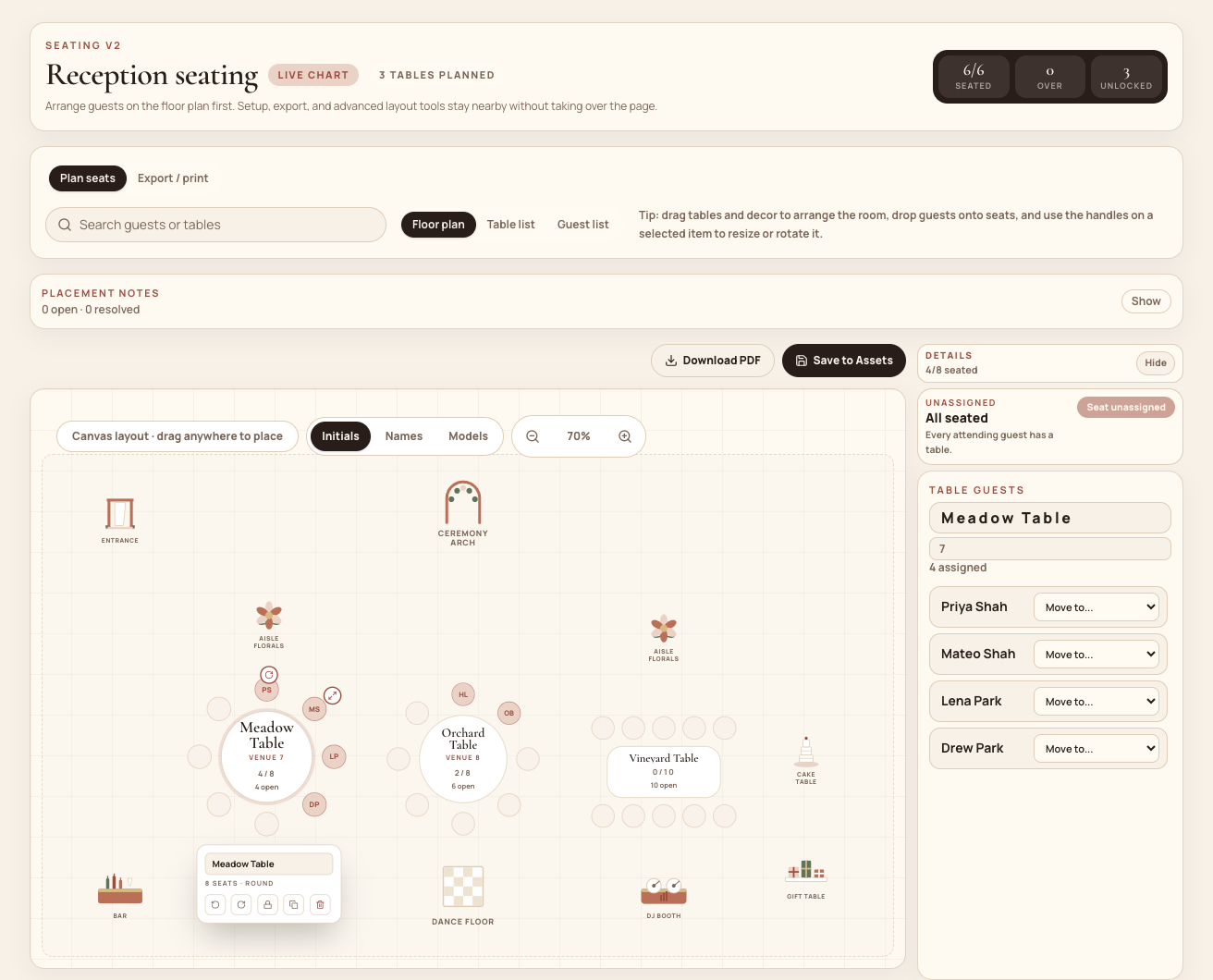
The floor-plan PDF answers the venue's visual questions: where tables sit, how the room flows, and where modeled elements such as the entrance, dance floor, bar, DJ booth, cake table, or florals belong. Mira generates a vector PDF from the seating canvas and can download it or save it to the wedding's Assets library.
Treat that PDF as an operational layout, not an architectural drawing. Mira does not turn the canvas into a measured room plan. If the venue requires exact aisle widths, exit clearance, power locations, load-in paths, or furniture dimensions, mark those on the venue's measured plan or include them in a separate setup note.
Pair the PDF with Mira's Venue CSV preset. It includes table number, venue-facing table name, seat number, guest first and last name, meal, guest notes, and table notes. You can add table shape, capacity, household, contact details, seat labels, or table status when the recipient needs them. Unassigned attending guests appear as unassigned rows, making them easier to catch before the file is sent.
Give the caterer service details, not just totals
A total headcount is not enough when individual meals or allergies determine service. Mira's caterer CSV includes attending guests with their meal, dietary notes, allergy severity, selection source, guest and household notes, table assignment, tags, and RSVP status. The catering workspace also surfaces missing meal choices and likely dietary exceptions so they can be reviewed before final counts are locked.
For a fuller handoff, Mira's Caterer packet produces a PDF summary plus source CSV files. Its summary includes headcount, meal rollup, relevant guest notes, and open catering-payment context. The downloadable bundle contains catering, guest, seating, and payment CSVs, along with an email draft. The floor-plan PDF, seating board, table signs, and place cards are separate exports; attach them separately when the recipient needs them.
Review the bundle before sending. Payment information may be useful for your coordinator but unnecessary for banquet staff. If the caterer only needs service data, send the caterer CSV and seating files rather than the complete bundle.
Most importantly, do not rely on an automated dietary flag as the final allergy review. Mira uses notes and keywords to surface likely exceptions. A person still needs to verify every allergy, its severity, the affected guest and table, and the caterer's agreed handling procedure.
Separate operational files from guest-facing print pieces
Your floor plan and CSV are working documents. The seating board, table signs, and place cards are guest-facing materials. Mira can produce a printable seating board grouped by table and place cards for assigned guests. Place cards show the guest, household, table, and a recorded meal preference when present, but they are not a substitute for the caterer's structured allergy record.
Mira also prepares an 18-by-24-inch VistaPrint poster layout and single-sided 5.5-by-8.5-inch VistaPrint tabletop signs, with bleed and safe-area handling for those products. Check every unassigned-guest warning before printing: an unassigned attending guest will not receive a place card, and an unfinished chart can put a warning directly into a print preview.
VistaPrint ordering remains manual. Mira generates the file and links to the relevant product, but it cannot upload the design or place the order. Different table-sign designs may need to be uploaded and ordered separately, or printed by a shop that accepts a multipage PDF.
If you design in Canva, Mira can save links for seating charts, name tags or place cards, table cards, and menu cards alongside the seating plan. It does not create the Canva design, merge guest data into it, or synchronize Canva edits back into Mira.
Assemble one clearly labeled handoff
A practical packet usually contains a floor-plan PDF, venue seating CSV, catering guest CSV, seating-board PDF, and table-sign PDF when the venue is responsible for printing. Add a short cover note with the final headcount, version date, primary contact, and instructions for reporting discrepancies.
Mira's Caterer packet can supply the PDF summary, source CSVs, recipient suggestions, readiness warnings, and an editable email draft. Because floor-plan and print files are separate exports, add those attachments yourself rather than assuming they are already in the bundle.
Put the version date in the email subject or filenames. Avoid sending a replacement attachment with the same name and no explanation. A useful revision note is specific: “Table 8: Jordan Lee moved to seat 4; vegetarian count remains unchanged.”
Complete the final handoff checklist
Ask the venue to confirm table names, capacities, room flow, measurements, and setup responsibilities. Ask the caterer to confirm headcount, meal totals, allergy handling, and whether table or seat numbers are required for service. After confirmation, keep one person responsible for changes: update Mira first, regenerate the affected files, and resend a clearly labeled revision with a short change summary.
- Every attending guest has a table assignment.
- No table exceeds its recorded capacity.
- Locked tables represent the version being sent.
- Venue-facing table names match the room setup.
- The floor plan reflects entrances, service paths, and major room elements.
- The venue's measured plan covers required dimensions, exits, clearances, and utilities.
- The final attending count matches the catering count.
- Every attending guest has a meal selection or an explicit resolution.
- Every allergy and its severity has been manually reviewed with the caterer.
- Each CSV contains only the fields its recipient needs.
- Place cards, table signs, and names have been checked for spelling and unassigned guests.
- Filenames or the email subject identify the final version date.
- The packet names one day-of contact.
- The venue and caterer have acknowledged receipt and confirmed their totals.
Common questions
Frequently asked questions
Should the venue receive the same CSV as the caterer?
Usually not. The venue generally needs table, seat, guest, and setup information. The caterer needs meal selections, dietary notes, allergy severity, and table assignments. Mira provides a Venue seating preset and a separate caterer CSV so each recipient can receive a focused file.
Does the floor-plan PDF include exact room measurements?
No. Mira's PDF represents the arranged seating canvas as a vector document, but it is not an architectural or measured floor plan. Use the venue's measured plan when exact dimensions, exits, aisle clearances, power, or utilities matter.
Can Mira send files directly to VistaPrint or Canva?
No. VistaPrint uploads and ordering remain manual. Canva support stores validated Canva design links; it does not create designs, populate guest names, or synchronize Canva changes.
What happens if someone changes after the packet is sent?
Update Mira first, regenerate the affected exports, and send a clearly labeled revision. Include a short change log so the venue and caterer know whether the update affects seating, meals, headcount, or print materials.
Turn the final chart into a clean handoff
Keep the room plan, guest assignments, and exports together.
Build the seating chart in one workspace, then send focused files to the venue and caterer without reconciling another spreadsheet.