Seating & floor plans
From RSVP Yes to a Finished Seating Chart
Turn confirmed RSVPs into a finished wedding seating chart with practical steps for rules, drafts, floor-plan review, table locks, and vendor handoffs.
Start with the people who actually said yes
The useful number for seating is not how many invitations you sent. It is how many individual guests are attending. A household may contain one yes and one no, and a plus-one may still be unnamed. Building from the invitation count creates empty seats and hides the guests who still need a decision.
Mira’s seating workspace uses the same household and guest records as RSVP tracking. Guests explicitly marked as attending are included; when an individual response is not set, an attending household can supply the attendance state. Pending and declined guests stay out of the seating pool. That keeps the chart connected to the current guest list rather than a second spreadsheet that gradually drifts out of date.
Close the RSVP gaps that affect the room
Do not wait for every small detail to be perfect, but resolve the uncertainties that change table count or placement. Follow up with pending households, confirm ambiguous plus-ones, and make sure each attending person has their own guest record. Meal selections and dietary notes do not determine who sits together, but cleaning them up now makes the final caterer handoff much safer.
Mira’s planning phases follow a practical sequence: close pending RSVPs after the response deadline, create a first seating pass, confirm that every attending guest has a table during the final month, then lock tables during wedding week. A late response can still change the plan, but it becomes a visible unassigned guest instead of disappearing into an old export.
Define the room before solving the relationships
Start with the venue’s real table inventory. Record each table’s capacity and shape, then account for any special arrangement such as a head table or sweetheart table. Mira can calculate a regular-table count from the number of attending guests and your chosen seats per table, with round, rectangular, or mixed table layouts. If the first question is capacity, use the wedding table-count guide and calculator before assigning people.
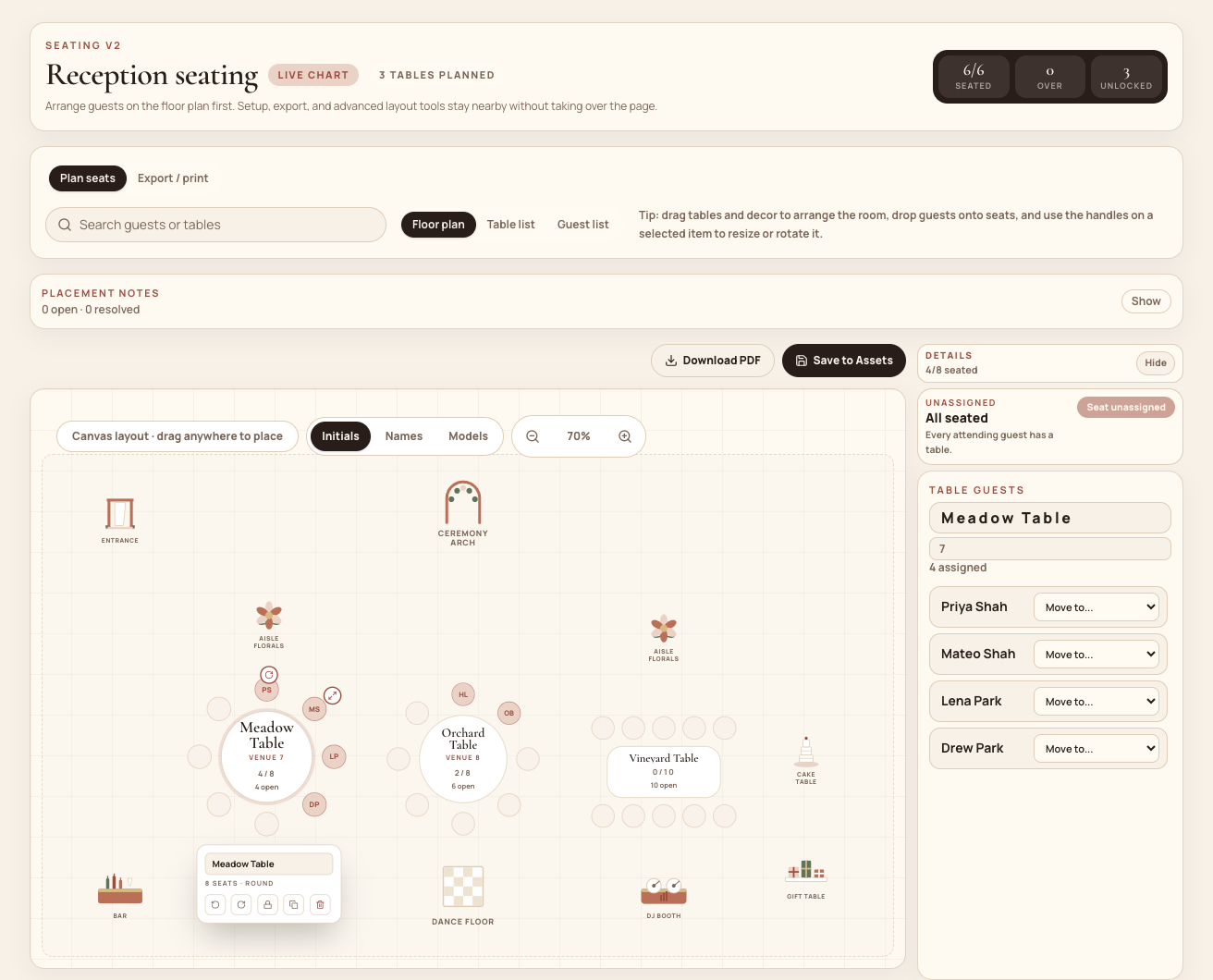
Capacity is only the first constraint. Use the floor-plan canvas to arrange tables around the entrance, ceremony area, dance floor, DJ booth, bar, florals, walls, and other landmarks. Tables and room elements can be moved, rotated, and resized. This is manual venue planning—not automatic interpretation of a floor-plan document—so confirm dimensions, aisles, accessibility, and service paths with the venue.
Turn social knowledge into explicit seating rules
A seating tool cannot infer family history from names. Record the relationships that would make a generated first pass useful: keep a household together, place a friend group near another group, keep two guests apart, or pin someone to a specific table. Rules can target an individual guest, a household, or an existing guest group.
Mira separates required rules from preferences. “Must sit apart,” “must sit together,” and exact-table placement are treated as constraints; “try together,” “nearby,” and “prefer apart” guide the first pass without pretending every preference can win. The workspace warns when a rule references guests who are not attending, overlaps with another target, or asks a group to fit at a table that is too small. Review the result yourself even when validation is clear: the generator provides a starting arrangement, not social judgment. For a tactful way to prioritize those decisions, read wedding seating rules for real family dynamics.
Generate a draft without disturbing the live chart
Once the attendance list, table assumptions, and rules are ready, generate a seating draft. Choose seats per table, table shape, whether households should stay together, and whether the plan needs a head or sweetheart table. Mira creates the tables and assigns attending guests while leaving the live chart unchanged.
That separation is useful when there are several plausible plans. You can duplicate a draft before experimenting and compare its table count, seated count, open guests, and validation issues. Draft validation calls out missing guests or tables, guests who are no longer attending, duplicate assignments, and tables over capacity. When a draft is ready, promote it to the live chart; Mira first saves the previous live chart as a rollback draft.
Refine, lock, and prepare the handoff
Use the floor plan for spatial review, the table list for comparing groups side by side, and the guest list for finding a specific person. Unassigned attending guests remain visible until they receive a table. Guests can be dragged between tables, moved in groups, or returned to the unassigned list. Placement notes give collaborators somewhere to record unresolved decisions instead of hiding them in a text thread.
Lock a table when its capacity and guest mix are approved. Locked tables are protected from later automated placement, allowing you to keep settled areas intact while working through the remainder. Before exporting, check that there are no unassigned attending guests, no over-capacity tables, and no tables still unintentionally left in draft status.
Mira can produce configurable seating CSVs with venue, planner, and contact-list presets. Available fields include table and seat numbers, guest and household details, RSVP state, meals, notes, table capacity, shape, and lock status. It also provides seating-board and place-card print views, VistaPrint-sized poster and table-sign layouts, PDF handoffs, and a place to keep related Canva design links. Use the final seating handoff guide to decide which recipient needs which file.
- Close or personally follow up with every pending household.
- Confirm individual attendance, including plus-ones.
- Obtain the venue’s table shapes, capacities, and room constraints.
- Decide whether you need a head or sweetheart table.
- Create guest groups and record only meaningful seating rules.
- Generate a draft without replacing the live chart.
- Resolve unassigned guests, duplicates, and over-capacity tables.
- Review sightlines, aisles, accessibility, and service routes with the venue.
- Lock approved tables before final exports.
- Export a recipient-specific file for the venue, caterer, planner, and printer.
- Recheck the chart after every late RSVP change.
- Revoke the full-chart share link when outside access is no longer needed.
Share the right version with the right people
A finished seating chart is an operational handoff, not merely a balanced screen. The venue may need table and meal columns, the setup team may need the floor plan, and the stationer may need names and table numbers. Export only the fields each recipient needs, label the file clearly, and agree on which version is final.
Mira offers two different visibility paths. A full-chart share link can be created for a planner or venue without requiring a login; anyone holding that link can see the chart, so it should be shared carefully and revoked or regenerated when necessary. Publishing seating to guests is separate: guests see their own table and tablemates in the Mira Weddings app, not the full planning chart.
The generator creates a first pass; it cannot infer relationships that were not recorded, and required rules still need human review when constraints conflict or exceed table capacity. Venue geometry must be checked against real measurements. Late RSVP changes can invalidate a draft. Mira prepares files and stores Canva links, but it does not replace venue approval, print fulfillment, or a designer’s production review.
See the connected workflow in the Mira wedding seating chart planner. When the guest list is ready, create a free Mira workspace and build the first draft from the records you already have.
Common questions
Frequently asked questions
Should we wait until every RSVP arrives before starting?
No. You can define tables, groups, and important rules earlier. Generate the serious first pass after the RSVP deadline, then keep late additions visible as unassigned guests until you place them.
Does Mira automatically decide who should sit together?
It creates a first pass from attendance, households, groups, capacities, and the rules you provide. It does not know unrecorded family dynamics or replace your review.
Can we try several seating arrangements?
Yes. Generate, duplicate, rename, and edit drafts without changing the live chart. Promoting a draft saves the previous live chart as a rollback draft first.
What can we give the venue or printer?
You can configure a CSV, download PDF handoffs, print a seating board or place cards, and prepare VistaPrint-sized posters and table signs. Confirm the vendor’s required dimensions and fields before sending the final version.
Put the guest list to work
Move from confirmed guests to a chart you can hand off.
See how Mira keeps RSVP records, seating drafts, the room plan, and final files in one connected workflow.