RSVP-connected attendees
Plan from attending guests—not a second list that drifts out of date. Search by guest, household, or group as assignments change.
Wedding seating chart planner
Build the seating chart from your live guest list, protect the relationships that matter, and turn the final plan into a floor plan, place cards, signs, and vendor-ready files.
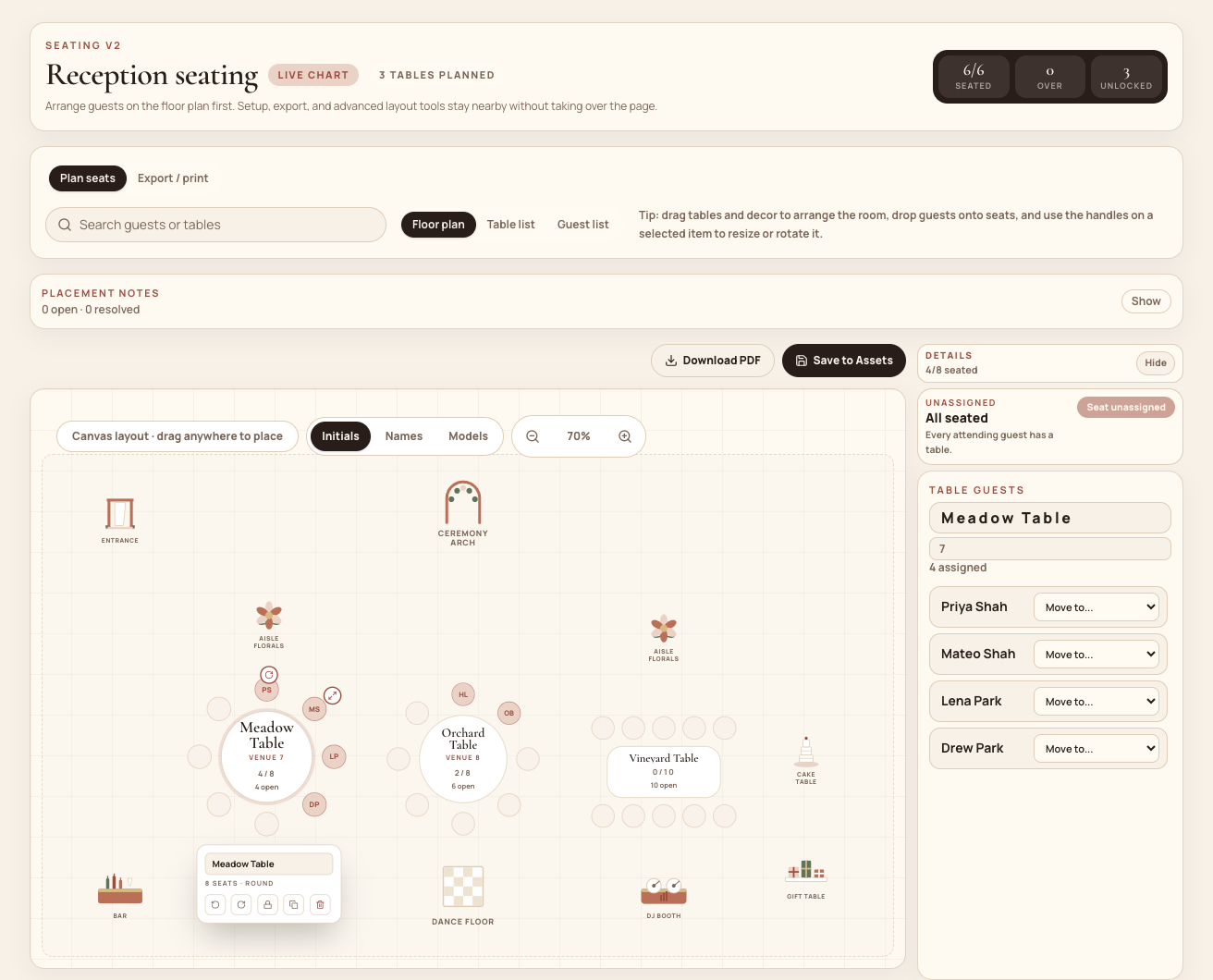
One connected workflow
Seating is where RSVP changes, family dynamics, venue constraints, and print deadlines meet. Mira keeps those decisions attached to the guest records they came from.
Attending guests flow in from the same RSVP-connected records you already use for households, groups, meals, and notes.
Keep a household together, seat groups near one another, keep specific guests apart, or pin someone to a table.
Generate and duplicate drafts, review unassigned guests and over-capacity tables, then promote the version you trust.
Place tables and venue details on the canvas, lock finished tables, then export the format your venue, printer, or planner needs.
Built for the decisions
Mira gives couples and planners the operational controls to make a seating plan, stress-test it, and keep it usable through the final RSVP change.
Plan from attending guests—not a second list that drifts out of date. Search by guest, household, or group as assignments change.
Create required and preferred seating rules, generate alternate drafts, and review conflicts before promoting a chart to live.
Drag, rotate, and scale tables; add the dance floor, DJ booth, bars, florals, walls, and other room landmarks.
Open the planner at the venue to search guests, check tables, and make last-minute seating changes without returning to a laptop.
Lock settled tables so later automated placement preserves the parts of the plan everyone has already approved.
Download configurable CSVs and PDFs, make place cards and table signs, prepare VistaPrint-sized files, and keep Canva design links nearby.
The final mile
A seating plan is not finished when it looks balanced on screen. It is finished when the venue, caterer, stationer, and setup team have the right version.
Choose the fields they need and export a seating CSV with table, seat, household, meal, and guest details.
Download the floor plan or a table-by-table PDF so the room setup and guest placements are easy to follow.
Generate place cards, table signs, and an 18 × 24 inch seating poster, including bleed and safe-area guidance for VistaPrint.
Keep Canva links for the seating chart, place cards, and table signs with the live plan while names and assignments stay in Mira.
Start with the real guest list
Create a free Mira workspace, bring in your guests, and move from attending households to a reception plan you can actually hand off.